🎟️ Code GREG takes $20 off every plan, forever. Ends in 48:00:00 This promo has ended. Prices are back to normal.
Skoot, the Skootly mascot

Hi, I'm Skoot 👋 I approve your members and save every answer for you.

Chrome extension for Skool admins

Approve your Skool members. Keep every answer.

Skootly sits in a side panel next to your Skool community. Approve everyone waiting in one click, send their membership answers to your Google Sheet, and follow up with each lead from a simple CRM.

Get $20 off every month → Use code GREG at checkout.
Offer ends in 48:00:00.
Pick your plan below.
Secure checkout by Stripe.
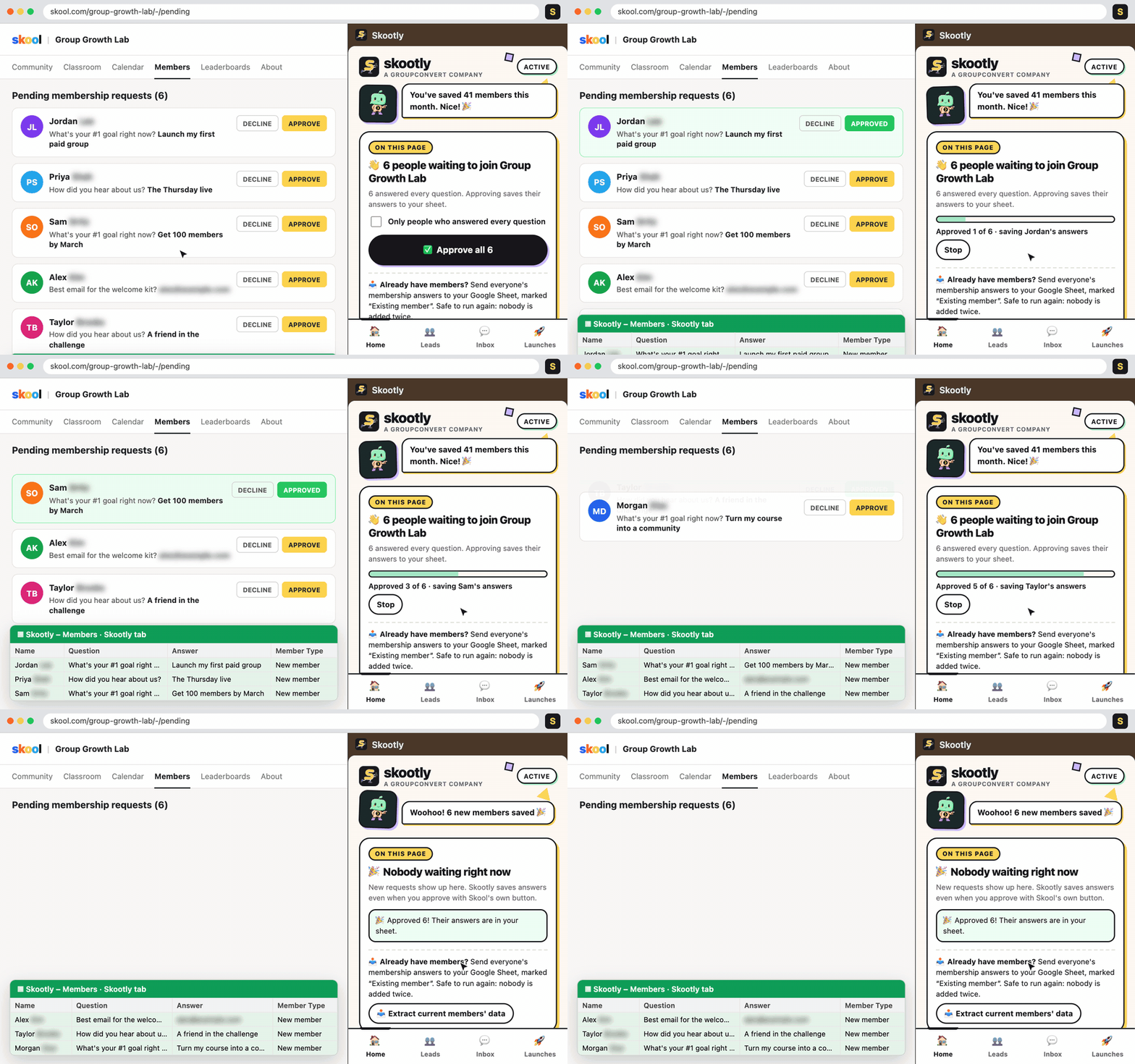
Skootly approving 6 pending Skool members in one click while their answers fill a Google Sheet
Approve all: 6 members approved, answers saved to the sheet.
See it work

Already have members? Skootly catches up, then keeps track.

Recorded with the real Skootly side panel and sample members. Last names and emails are blurred.

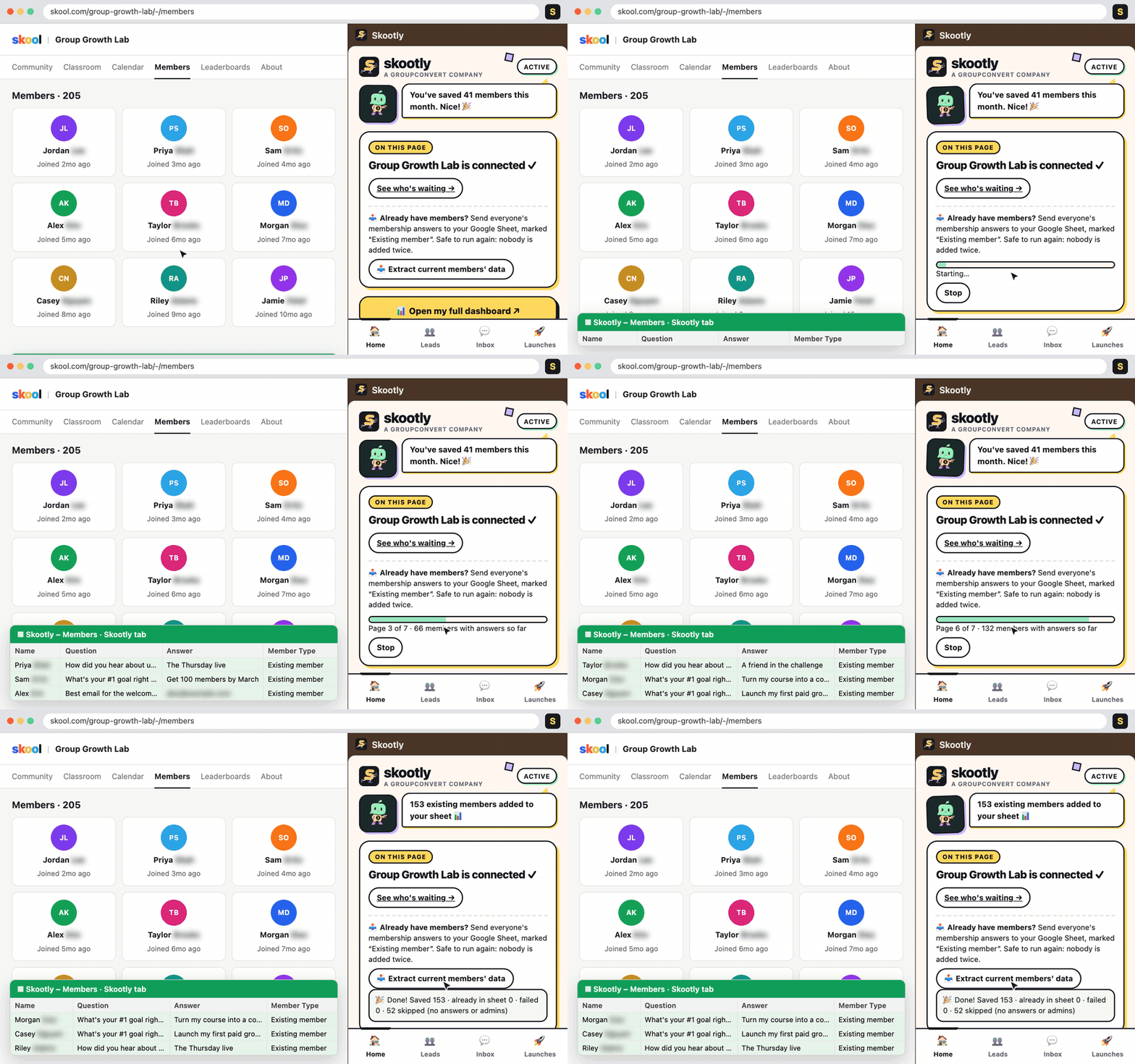
Skootly sending 153 existing members' answers to a Google Sheet, marked Existing member
Extract current members. Everyone who already joined lands in your sheet, marked “Existing member”.
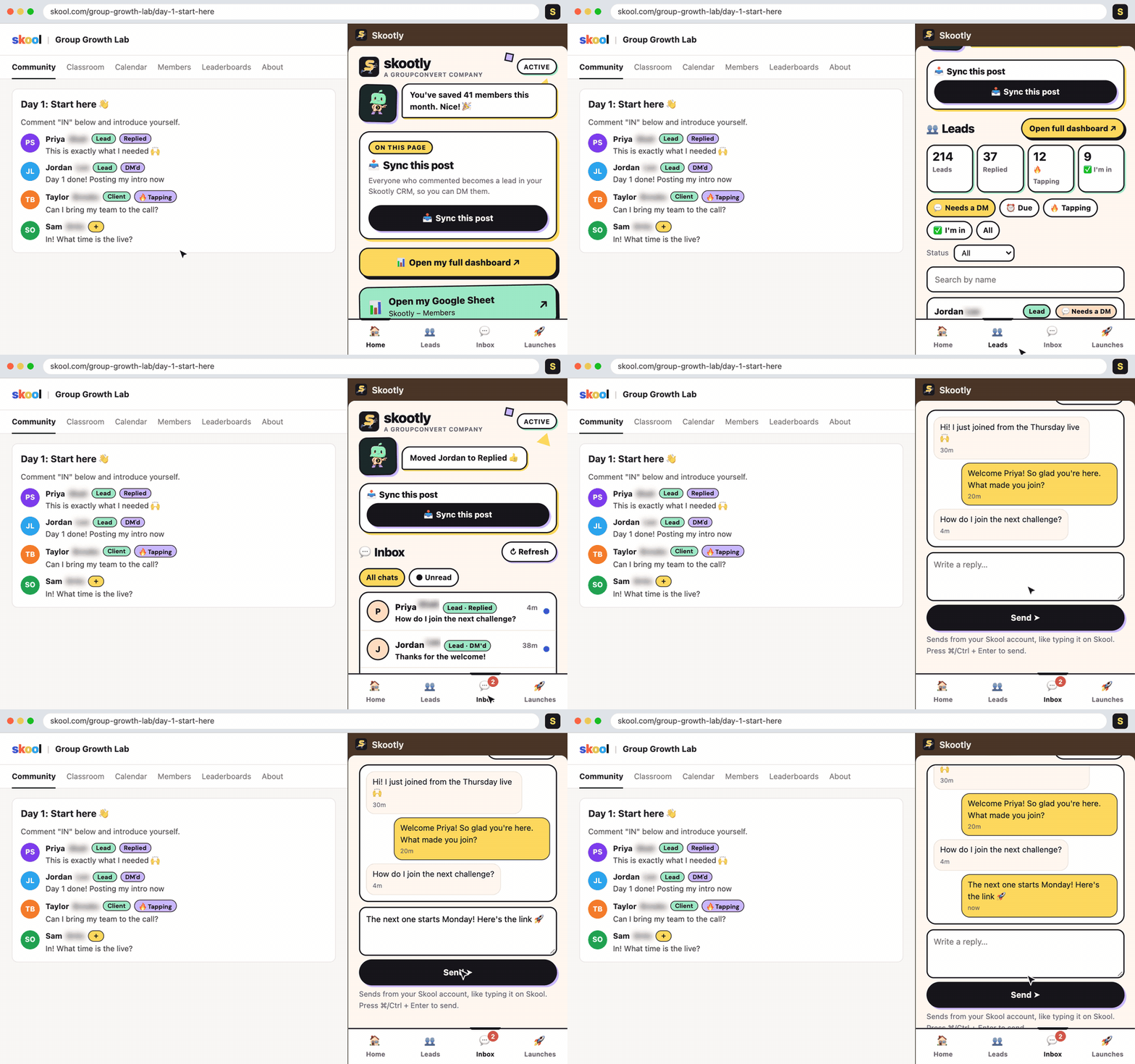
Skootly showing lead tags next to names on Skool, the Leads tab, and replying to a Skool chat from the side panel
Leads and Inbox. Status and stage tags show next to names on Skool. Move a lead, then answer their chat from the side panel.
How it works

Set up once, then approve from the side panel.

  1. Pick your plan

    Check out with code GREG. Then join the Skootly community on Skool for your next steps.

  2. Connect your sheet

    Link the Google Sheet where you want member answers to land. Skootly adds a Skootly tab with the headers filled in.

  3. Open your pending page

    Click Approve all in the side panel. Each approved member's answers go straight to the sheet and into your CRM.

What you get today

Everything in Skootly right now.

No roadmap promises on this page. These features are live today.

On your Skool pending page

Approve all, with a stop button

  • Approve everyone waiting in one click, with a progress bar
  • Stop the run at any point
  • Approving one person with Skool's own button saves their answers too

In your Google Sheet

Answers saved automatically

  • Name, membership question answers and location for every approval
  • Member type column marks new and existing members
  • Pull answers from members you approved before Skootly with Extract current members
Side panel + app.skootly.com/crm

A CRM built for Skool

  • Approved members become leads on their own
  • Sync a post to add everyone who commented
  • Status (who they are) and stage (where they are) for each lead
  • Those tags show up next to member names on Skool
Side panel inbox

DMs without the tab hopping

  • Read your Skool chats in the side panel
  • Save DM templates, including a welcome message for new approvals
  • Copy a message and open the member's chat in one click
  • Your chats stay in your browser and are never sent to Skootly's servers
Launches tab

Track a launch

  • Group leads under a launch and see where each one stands
  • Pull rows in from a team Google Sheet every 5 minutes
Sync tab

Send leads to your other tools

  • Two-way Google Sheet sync for your CRM
  • GoHighLevel contacts with stage and launch tags (your own account key)
  • Kit subscribers, tagged the same way
Plans

$20 off every plan, forever, with code GREG.

Pick your Skootly plan.

Checkout is secure through Stripe. Cancel anytime. After checkout you'll join the Skootly community on Skool.

Promo codeGREGends in 48:00:00

Standard

Starter
$7$27/month

with code GREG · $27/month · forever

Cancel anytime

  • One-click Approve All for pending members
  • Member answers saved to Google Sheets
  • Import your existing members' answers
  • Member tagging & tracking on Skool
  • DM inbox + welcome DM templates
  • Sync to GoHighLevel & Kit
  • Setup lesson + support
Get Standard

Premium

Most popular
$79$99/month

with code GREG · $99/month · forever

Cancel anytime

  • Everything in Standard
  • Manage your community with AI (Skootly MCP)
  • Launch tracking for every lead
  • 2 team member seats
  • Free GoHighLevel CRM account
  • Skool Group Audit Report by Kim
  • Setup call + priority support
Get Premium

VIP

Best value
$977$997/year

with code GREG · $997/year · forever

Cancel anytime

  • Premium access for a full year
  • 2 months free vs Premium monthly
  • We set up Skootly for you
Get VIP

Secure checkout by Stripe. Have a different code? Enter it in the Promo code box on the order page.

Questions

Before you install

How do I use the promo code?

Click a plan, then type GREG in the Promo code box on the order page. While your timer is running the code is filled in for you. The $20 discount stays on every bill for as long as you keep your plan.

What happens after I pay?

You land on a page to join the Skootly community on Skool, where you'll find your next steps. Sign in to Skootly with the same email you used at checkout.

Do I need to be an admin of the Skool community?

Yes. Skootly works on the pending requests and members pages, which only community admins can see.

Which browser does it work in?

Google Chrome on a desktop or laptop. Skootly runs as a Chrome side panel next to your Skool tab.

Where does my member data go?

Membership answers go to the Google Sheet you connect and to your Skootly CRM. You can delete any lead at any time. Your Skool chats are read in your browser and never stored on Skootly's servers.

Do I need GoHighLevel or Kit?

No. Both are optional. Connect them from the Sync tab only if you already use them.

Can I cancel?

Yes, anytime, from your billing page. Your Google Sheet stays yours after you cancel.

Skoot, the Skootly mascot

Stop copying answers out of Skool by hand.

Approve your members, keep their answers and follow up with the right people, all from one side panel.

Claim $20 off →